mirror of
https://github.com/lutinglt/gitea-github-theme.git
synced 2026-10-28 09:44:55 +00:00

272 lines
12 KiB
Markdown
272 lines
12 KiB
Markdown
<h1 align="center">
|
|
<p>Gitea GitHub Theme</p>
|
|
<img src="https://img.shields.io/github/issues-raw/lutinglt/gitea-github-theme?style=for-the-badge&labelColor=25292e&color=1a7f37">
|
|
<img src="https://img.shields.io/github/issues-closed-raw/lutinglt/gitea-github-theme?style=for-the-badge&labelColor=25292e&color=8250df">
|
|
<img src="https://img.shields.io/github/downloads/lutinglt/gitea-github-theme/total?style=for-the-badge&labelColor=25292e&color=1f6feb">
|
|
<img src="https://img.shields.io/github/downloads/lutinglt/gitea-github-theme/latest/total?style=for-the-badge&labelColor=25292e&color=238636">
|
|
</h1>
|
|
|
|
<h4 align="center">
|
|
|
|
A Gitea theme that pursues GitHub style not only in colors but also in styling details.
|
|
|
|
</h4>
|
|
|
|
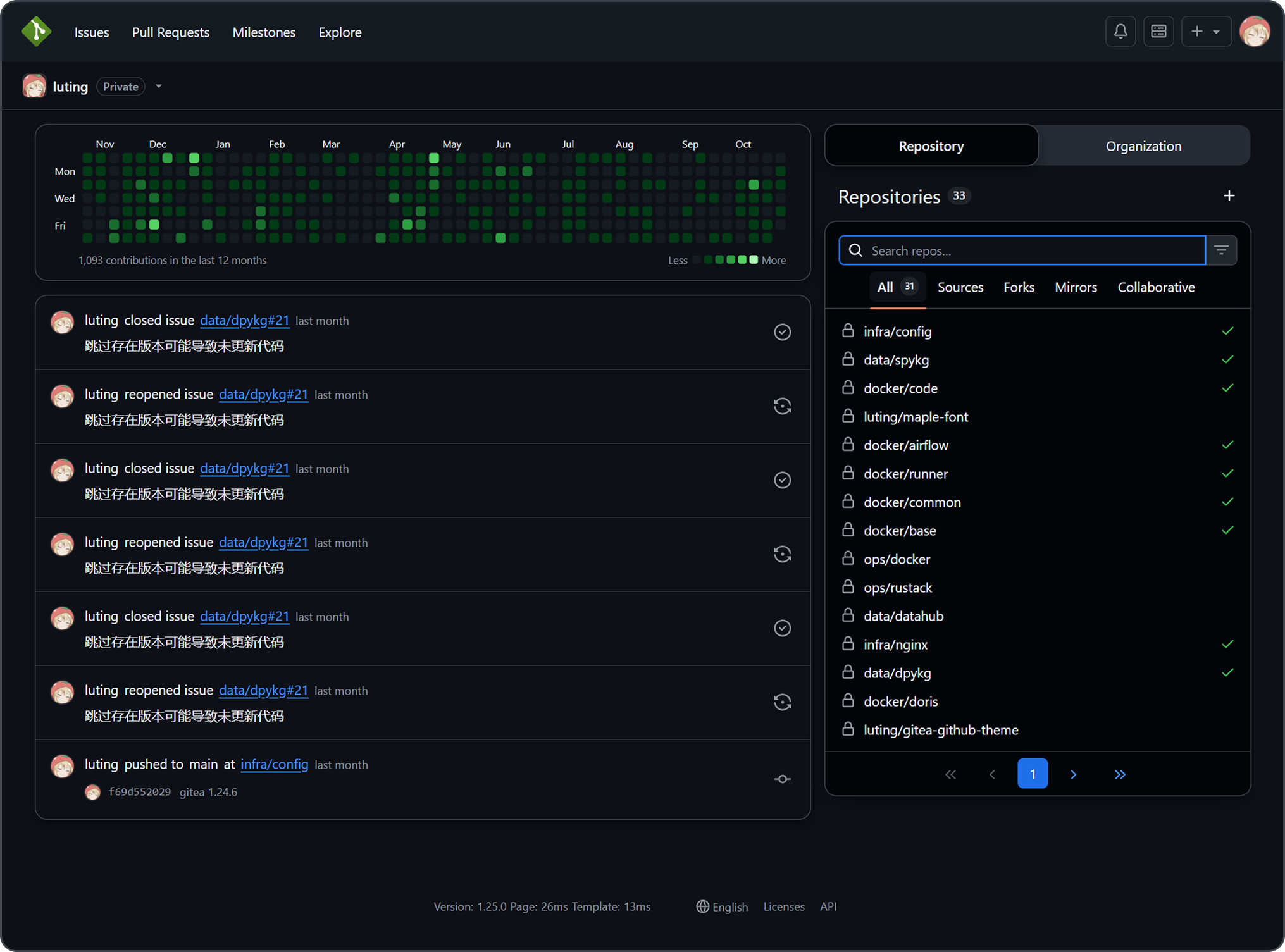
|
|
|
|
## Version Number Explanation
|
|
|
|
The theme version number is kept consistent with the Gitea version number
|
|
|
|
Gitea version number format: `major.minor.patch`
|
|
|
|
Theoretically, minor version changes in Gitea do not modify the frontend layout, so the minor version of the theme is
|
|
applicable to all Gitea versions with the same major version number.
|
|
|
|
For example: Theme version `28.2.1` is applicable to Gitea versions `>=28.0.0` `<29.0.0`
|
|
|
|
Only the latest released Gitea version is maintained. Issues and PRs for other older theme versions will not be
|
|
accepted.
|
|
|
|
> [!IMPORTANT]
|
|
>
|
|
> Gitea version number format for 1.27 and earlier: `1.major.minor`
|
|
>
|
|
> For example: Theme version `1.24.5` is applicable to Gitea versions `>=1.24.0` `<1.25.0`
|
|
|
|
## Installation
|
|
|
|
> [!IMPORTANT]
|
|
>
|
|
> Because the project uses new CSS features, ensure styles are applied correctly by keeping Chrome/Edge >= 120,
|
|
> Firefox >= 121, Safari >= 16.5
|
|
|
|
1. Download the latest CSS theme file from the release page and place it in the `data/gitea/public/assets/css` directory
|
|
(This directory may not be available by default and needs to be manually created)
|
|
2. Modify `data/gitea/conf/app.ini` and append the CSS filename without the `theme-` prefix to the end of `THEMES` under
|
|
the `[ui]` section
|
|
3. Restart Gitea
|
|
4. Check the theme in the settings
|
|
|
|
Example: If the theme filename is `theme-github-dark.css`, add `github-dark` to the end of `THEMES`
|
|
|
|
Example `data/gitea/conf/app.ini`:
|
|
|
|
```ini
|
|
[ui]
|
|
THEMES = gitea-auto, gitea-light, gitea-dark, github-auto, github-light, github-dark, github-soft-dark
|
|
```
|
|
|
|
> [!TIP]
|
|
>
|
|
> When THEMES is not set, Gitea will use all themes
|
|
|
|
> [!IMPORTANT]
|
|
>
|
|
> Automatic color theme requires both light and dark theme files.
|
|
|
|
For details, please refer to the Gitea documentation
|
|
[Gitea docs](https://docs.gitea.com/next/administration/customizing-gitea#customizing-the-look-of-gitea)
|
|
|
|
### Template File Installation (Optional)
|
|
|
|
> [!IMPORTANT]
|
|
>
|
|
> The template modifies Gitea's layout to make it closer to GitHub's layout. Do not use template files across versions,
|
|
> as this may lead to missing functionality, Gitea instance failing to start, and other issues.
|
|
>
|
|
> Template layout is bound to the Gitea instance and will affect all themes, impacting the experience of other
|
|
> non-project themes.
|
|
|
|
1. Download the latest template files from the release page and place them in the `data/gitea/templates` directory (This
|
|
directory may not be available by default and needs to be manually created)
|
|
2. Restart Gitea
|
|
|
|
### Translation File Installation (Optional)
|
|
|
|
> [!TIP]
|
|
>
|
|
> Translation files are only needed when using this project's template files to provide support for non-English
|
|
> languages.
|
|
|
|
1. Download the latest translation files from the release page and place them in the `data/gitea/options/locale`
|
|
directory (This directory may not be available by default and needs to be manually created)
|
|
2. Restart Gitea
|
|
|
|
## Screenshots
|
|
|
|
### Default Themes
|
|
|
|
```ini
|
|
THEMES = github-auto, github-light, github-dark, github-soft-dark
|
|
```
|
|
|
|
<details>
|
|
<summary>Default</summary>
|
|
<h4>theme-github-light.css</h4>
|
|
<img src="https://raw.githubusercontent.com/lutinglt/gitea-github-theme/assets/screenshots/light.png"/>
|
|
<h4>theme-github-dark.css</h4>
|
|
<img src="https://raw.githubusercontent.com/lutinglt/gitea-github-theme/assets/screenshots/dark.png"/>
|
|
<h4>theme-github-soft-dark.css</h4>
|
|
<img src="https://raw.githubusercontent.com/lutinglt/gitea-github-theme/assets/screenshots/soft-dark.png"/>
|
|
</details>
|
|
|
|
### Colorblind Themes (Beta)
|
|
|
|
```ini
|
|
THEMES = github-colorblind-auto, github-colorblind-light, github-colorblind-dark
|
|
THEMES = github-tritanopia-auto, github-tritanopia-light, github-tritanopia-dark
|
|
```
|
|
|
|
<details>
|
|
<summary>Colorblind & Tritanopia</summary>
|
|
<h4>theme-github-colorblind-light.css & theme-github-tritanopia-light.css</h4>
|
|
<img src="https://raw.githubusercontent.com/lutinglt/gitea-github-theme/assets/screenshots/colorblind/colorblind-light.png"/>
|
|
<h4>theme-github-colorblind-dark.css & theme-github-tritanopia-dark.css</h4>
|
|
<img src="https://raw.githubusercontent.com/lutinglt/gitea-github-theme/assets/screenshots/colorblind/colorblind-dark.png"/>
|
|
</details>
|
|
|
|
### HighContrast Themes
|
|
|
|
```ini
|
|
THEMES = github-high-contrast-auto, github-high-contrast-light, github-high-contrast-dark, github-high-contrast-soft-dark
|
|
```
|
|
|
|
<details>
|
|
<summary>HighContrast</summary>
|
|
<h4>theme-github-high-contrast-light.css</h4>
|
|
<img src="https://raw.githubusercontent.com/lutinglt/gitea-github-theme/assets/screenshots/high-contrast/high-contrast-light.png"/>
|
|
<h4>theme-github-high-contrast-dark.css</h4>
|
|
<img src="https://raw.githubusercontent.com/lutinglt/gitea-github-theme/assets/screenshots/high-contrast/high-contrast-dark.png"/>
|
|
<h4>theme-github-high-contrast-soft-dark.css</h4>
|
|
<img src="https://raw.githubusercontent.com/lutinglt/gitea-github-theme/assets/screenshots/high-contrast/high-contrast-soft-dark.png"/>
|
|
</details>
|
|
|
|
### HighContrast Colorblind Themes ( Beta )
|
|
|
|
```ini
|
|
THEMES = github-high-contrast-colorblind-auto, github-high-contrast-colorblind-light, github-high-contrast-colorblind-dark
|
|
THEMES = github-high-contrast-tritanopia-auto, github-high-contrast-tritanopia-light, github-high-contrast-tritanopia-dark
|
|
```
|
|
|
|
<details>
|
|
<summary>HighContrast Colorblind & Tritanopia</summary>
|
|
<h4>theme-github-high-contrast-colorblind-light.css & theme-github-high-contrast-tritanopia-light.css</h4>
|
|
<img src="https://raw.githubusercontent.com/lutinglt/gitea-github-theme/assets/screenshots/high-contrast-colorblind/high-contrast-colorblind-light.png"/>
|
|
<h4>theme-github-high-contrast-colorblind-dark.css & theme-github-high-contrast-tritanopia-dark.css</h4>
|
|
<img src="https://raw.githubusercontent.com/lutinglt/gitea-github-theme/assets/screenshots/high-contrast-colorblind/high-contrast-colorblind-dark.png"/>
|
|
</details>
|
|
|
|
### Pink Themes
|
|
|
|
```ini
|
|
THEMES = github-pink-auto, github-pink-light, github-pink-dark, github-pink-soft-dark
|
|
```
|
|
|
|
<details>
|
|
<summary>Pink</summary>
|
|
<h4>theme-github-pink-light.css</h4>
|
|
<img src="https://raw.githubusercontent.com/lutinglt/gitea-github-theme/assets/screenshots/pink/pink-light.png"/>
|
|
<h4>theme-github-pink-dark.css</h4>
|
|
<img src="https://raw.githubusercontent.com/lutinglt/gitea-github-theme/assets/screenshots/pink/pink-dark.png"/>
|
|
<h4>theme-github-pink-soft-dark.css</h4>
|
|
<img src="https://raw.githubusercontent.com/lutinglt/gitea-github-theme/assets/screenshots/pink/pink-soft-dark.png"/>
|
|
</details>
|
|
|
|
### Gitea Themes
|
|
|
|
```ini
|
|
THEMES = github-gitea-auto, github-gitea-light, github-gitea-dark, github-gitea-arc-green
|
|
```
|
|
|
|
<details>
|
|
<summary>Gitea</summary>
|
|
<h4>theme-github-gitea-light.css</h4>
|
|
<img src="https://raw.githubusercontent.com/lutinglt/gitea-github-theme/assets/screenshots/gitea/gitea-light.png"/>
|
|
<h4>theme-github-gitea-dark.css</h4>
|
|
<img src="https://raw.githubusercontent.com/lutinglt/gitea-github-theme/assets/screenshots/gitea/gitea-dark.png"/>
|
|
<h4>theme-github-gitea-arc-green.css</h4>
|
|
<img src="https://raw.githubusercontent.com/lutinglt/gitea-github-theme/assets/screenshots/gitea/gitea-arc-green.png"/>
|
|
</details>
|
|
|
|
### Catppuccin Themes
|
|
|
|
```ini
|
|
THEMES = github-catppuccin-auto, github-catppuccin-latte, github-catppuccin-frappe, github-catppuccin-macchiato, github-catppuccin-mocha
|
|
```
|
|
|
|
<details>
|
|
<summary>Catppuccin</summary>
|
|
<h4>theme-github-catppuccin-latte.css</h4>
|
|
<img src="https://raw.githubusercontent.com/lutinglt/gitea-github-theme/assets/screenshots/catppuccin/catppuccin-latte.png"/>
|
|
<h4>theme-github-catppuccin-frappe.css</h4>
|
|
<img src="https://raw.githubusercontent.com/lutinglt/gitea-github-theme/assets/screenshots/catppuccin/catppuccin-frappe.png"/>
|
|
<h4>theme-github-catppuccin-macchiato.css</h4>
|
|
<img src="https://raw.githubusercontent.com/lutinglt/gitea-github-theme/assets/screenshots/catppuccin/catppuccin-macchiato.png"/>
|
|
<h4>theme-github-catppuccin-mocha.css</h4>
|
|
<img src="https://raw.githubusercontent.com/lutinglt/gitea-github-theme/assets/screenshots/catppuccin/catppuccin-mocha.png"/>
|
|
</details>
|
|
|
|
## Custom CSS Variables
|
|
|
|
You can customize parts of the theme style according to your preferences
|
|
|
|
### Usage Method
|
|
|
|
Add the following code at the beginning or end of the theme's CSS file
|
|
|
|
```css
|
|
:root {
|
|
--custom-clone-menu-width: 150px;
|
|
...
|
|
}
|
|
```
|
|
|
|
> [!IMPORTANT]
|
|
>
|
|
> Please ensure to add custom variables in the `:root` selector, otherwise they will not take effect
|
|
>
|
|
> Variables are separated by `;`
|
|
>
|
|
> It is recommended to place custom variables in a separate file and append them to the theme file using shell commands
|
|
> or other methods
|
|
|
|
### CSS Variables
|
|
|
|
| Variable Name | Description | Default | Github | Recommend | Min | Max |
|
|
| :-------------------------------- | :------------------------------------------------------- | :------ | :----- | :-------- | :---- | :---- |
|
|
| --custom-branch-menu-width | Branch menu width | 320px | 320px | 320px | Gitea | 640px |
|
|
| --custom-clone-menu-width | Clone button menu width | Gitea | 332px | 200px | 150px | 400px |
|
|
| --custom-user-menu-width | User menu width | 192px | 200px | | Gitea | 320px |
|
|
| --custom-explore-repolist-columns | Number of repository list columns on explore page | 2 | 2 | 2 | | |
|
|
| --custom-explore-userlist-columns | Number of user/organization list columns on explore page | 3 | 1 | 2/3 | | |
|
|
| --custom-user-repolist-columns | Number of repository list columns on user page | 2 | 2 | 1/2 | | |
|
|
| --custom-org-repolist-columns | Number of repository list columns on organization page | 1 | 1 | 1/2 | | |
|
|
| --custom-org-userlist-columns | Number of user list columns on organization page | 2 | 1 | 1/2 | | |
|
|
|
|
## Using Development Version of the Theme
|
|
|
|
You might want to use the development version of the theme instead of the released version
|
|
|
|
Please ensure you have Bun environment installed, Bun 1.3.14 or above is recommended
|
|
|
|
```bash
|
|
git clone https://github.com/lutinglt/gitea-github-theme.git
|
|
cd gitea-github-theme
|
|
bun install
|
|
bun bundle
|
|
```
|
|
|
|
After compilation, theme files will be generated in the `dist` directory. You can place the theme files into the
|
|
`gitea/public/assets/css` directory, then add the theme name to the end of `THEMES` in `gitea/conf/app.ini`
|
|
|
|
## Star History
|
|
|
|
<a href="https://www.star-history.com/#lutinglt/gitea-github-theme&type=date&legend=top-left">
|
|
<picture>
|
|
<source media="(prefers-color-scheme: dark)" srcset="https://api.star-history.com/svg?repos=lutinglt/gitea-github-theme&type=date&theme=dark&legend=top-left" />
|
|
<source media="(prefers-color-scheme: light)" srcset="https://api.star-history.com/svg?repos=lutinglt/gitea-github-theme&type=date&legend=top-left" />
|
|
<img alt="Star History Chart" src="https://api.star-history.com/svg?repos=lutinglt/gitea-github-theme&type=date&legend=top-left" />
|
|
</picture>
|
|
</a>
|